


|
Name |
Naptime Jugo |
|---|---|
|
Category |
Tools |
|
Developer |
Francisco Franco |
| Last version | 8.4.1 |
|
Updated |
|
|
Compatible with |
Android 8.0+ |
Introduction to Naptime Jugo APK
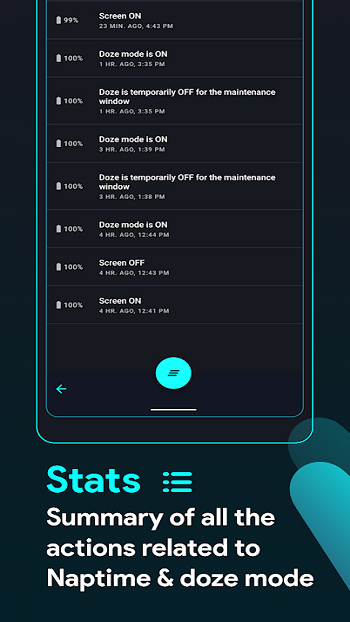
Naptime Jugo is a mobile utility app for Android designed to reduce battery drain when a device is idle. It works by controlling Android’s built-in Doze power-saving system and forcing it to activate sooner than usual. Many phones wait a long time before entering Doze mode, which means background apps continue consuming energy. This app adjusts those settings so the phone can conserve power faster after the screen turns off.
The main goal of Naptime Jugo is simple: extend battery life without requiring constant manual adjustments. Once configured, the app pushes the system into Doze mode shortly after the screen goes dark. During this state, background processes pause, network activity is restricted, and unnecessary system tasks slow down. The result is reduced power consumption while the device rests in your pocket or on a desk.
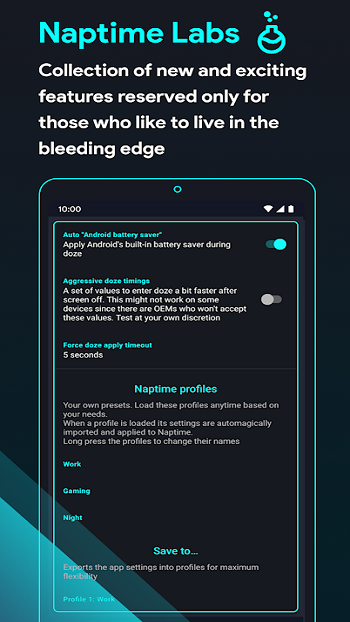
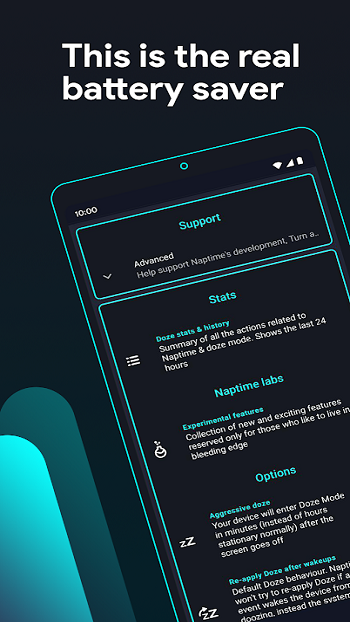
One of the most notable features is Aggressive Doze mode. This setting triggers Doze immediately after the screen turns off and can even disable motion sensors that would normally wake the system. By doing this, the phone stays in a low-power state even if it moves slightly. The app also allows deeper customization, such as adjusting the timing of Doze parameters or creating usage profiles that fit different routines.
Naptime Jugo also includes automation options that reduce background activity further. Certain settings can temporarily disable Wi-Fi, mobile data, location services, or Bluetooth once Doze activates. Users can create quick profiles and toggle them through system shortcuts. For advanced users, deeper control becomes available when the device has root access or when specific permissions are granted through ADB.
The benefits are clear for people who struggle with battery drain during standby time. Phones left idle overnight or during long workdays may keep their charge longer because background activity stays limited. The app works especially well on devices running Android versions that support Doze but do not activate it aggressively by default.
There are also a few trade-offs. When Doze is forced, some apps may delay notifications or stop streaming services while the screen is off. Network access is restricted, and certain scheduled tasks wait until the system temporarily wakes up. Some devices may also show minor compatibility issues if motion sensors are disabled. Users who depend on real-time notifications might need to whitelist specific apps in the battery optimization settings.
Naptime Jugo fits best for Android users focused on battery efficiency, especially those comfortable adjusting system settings. It is useful on older phones, devices with smaller batteries, or situations where charging is not always available. People who like tweaking system behavior will likely appreciate the level of control the app provides.
FAQs Naptime Jugo
What is Naptime Jugo APK used for?
+
Naptime Jugo APK is an Android utility app that improves battery efficiency by forcing the system’s Doze mode to activate faster when the screen turns off, reducing background activity.
How does Naptime Jugo help save battery on Android phones?
+
It pushes the device into Doze mode sooner and limits background tasks such as network access, sensors, and scheduled jobs while the screen is off.
Does Naptime Jugo require root access to work?
+
Many features work without root, but full control over aggressive Doze settings usually requires root or special permissions granted through ADB commands.
Why might notifications stop when using aggressive Doze mode?
+
Aggressive Doze limits network access and background processes. Only high-priority notifications arrive instantly, while others appear during maintenance windows.
Who should use Naptime Jugo on Android devices?
+
It suits users who want longer standby battery life, especially those comfortable adjusting system settings or managing battery optimization options.
Discover More Interesting Apps
-
 Mod
Mod
Multiple Accounts
vv5.5.0
209.47 MB
Updated -
Theick.io
v0.4.8
29 MB
Updated -
Mod
Remote Mouse Pro
v5.306
63 MB
Updated -
Mod
TLS Tunnel
v7.2.6
27.95 Mb
Updated -
Ace Stream
v3.2.19.5
107.59 Mb
Updated -
90 FPS
v11.4
16.02 Mb
Updated -
Mod
Medix
v1.4.0
69.80 Mb
Updated -
Mod
Multi App
v2.7.0
37.47 Mb
Updated -
Sophon
v1.0.54.1
65.80 Mb
Updated -
Mod
SWAP - No ROOT
vv4.8.8
8.41 Mb
Updated










Share Your Thoughts